
Your first ZUGFeRD invoice with FaeBill in 5 minutes
Introduction: your invoicing needs an upgrade
Are paper invoices piling up at your business too? Does manually entering invoice data into your accounting system cost you valuable hours every week? You are not alone. Many small and medium-sized businesses lose valuable working time every month to manual invoicing processes.
The good news: ZUGFeRD invoices are changing the way businesses create, send and process invoices. The best part? With the right software such as FaeBill, you can create your first ZUGFeRD-compliant e-invoice in just 5 minutes – without technical know-how and without complicated set-up.
In this tutorial, we show you step by step how to:
- Understand what ZUGFeRD, the German hybrid e-invoice standard published by FeRD (Forum elektronische Rechnung Deutschland), is and why it is the future of invoicing
- Create your first ZUGFeRD invoice with FaeBill
- Save time and improve your liquidity through faster payment processes
- Understand the legal requirements since 2025 and from 2027
Invest 5 minutes of your time now – and benefit in the long term from a digitalised, automated invoicing process.
Create a ZUGFeRD file without programming skills
You need neither XML nor programming skills: you enter your invoice data into a form, and FaeBill generates the ZUGFeRD file from it, i.e. a PDF with embedded XML.
Tutorial: your first ZUGFeRD invoice with FaeBill – in just 5 minutes
Let's get started! Follow this step-by-step tutorial and create your first professional ZUGFeRD invoice.
Requirements:
- Internet connection
- E-mail address
- 5 minutes of time
⏱ Step 1: Register with FaeBill for free (60 seconds)
- Visit www.faebill.com
- Click on "Konto erstellen" (Create account)
- Enter your e-mail address and a secure password
- Confirm your e-mail address (check your inbox)
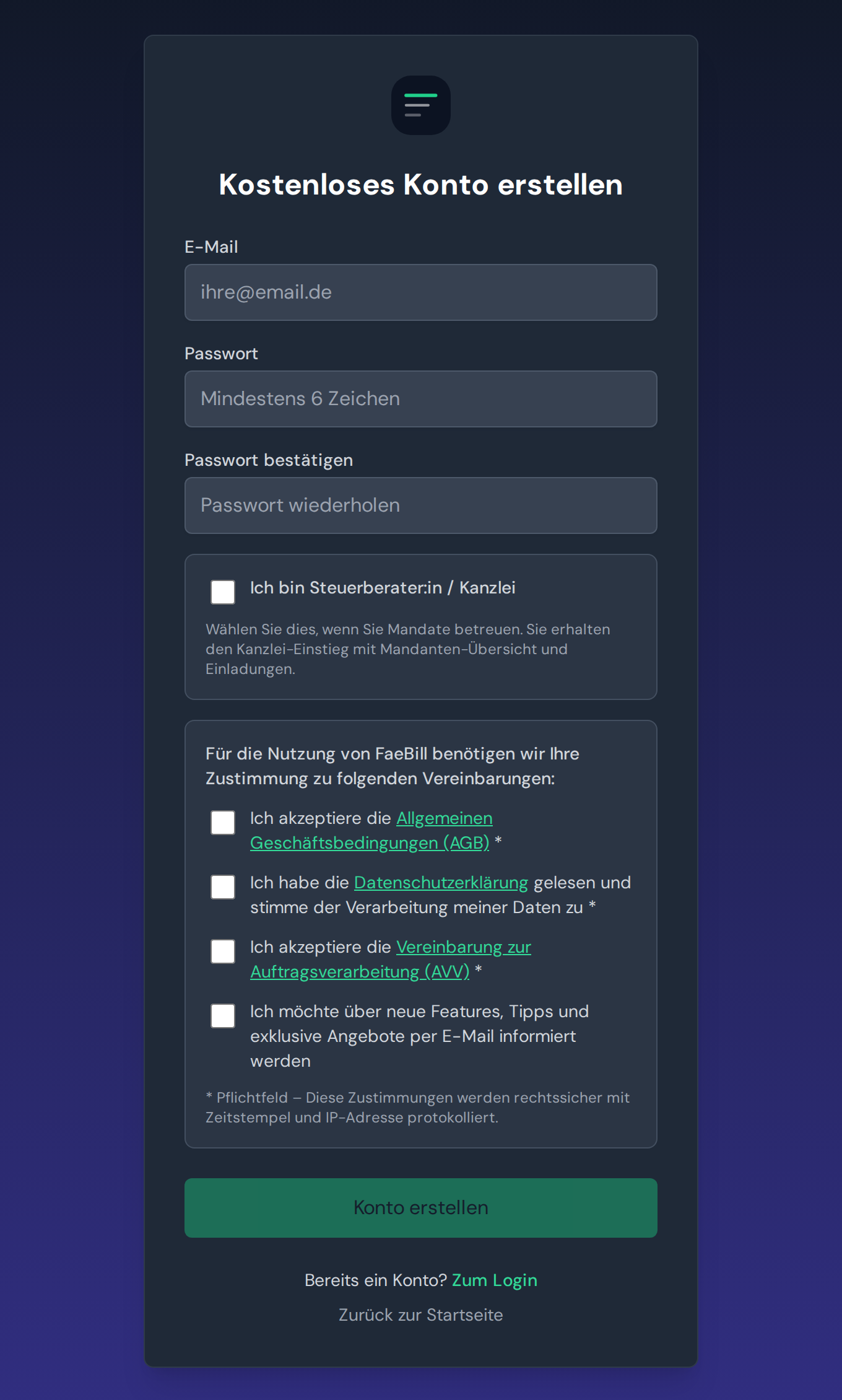
Done! You are now in your personal FaeBill dashboard.
⏱ Step 2: Enter your company details (90 seconds)
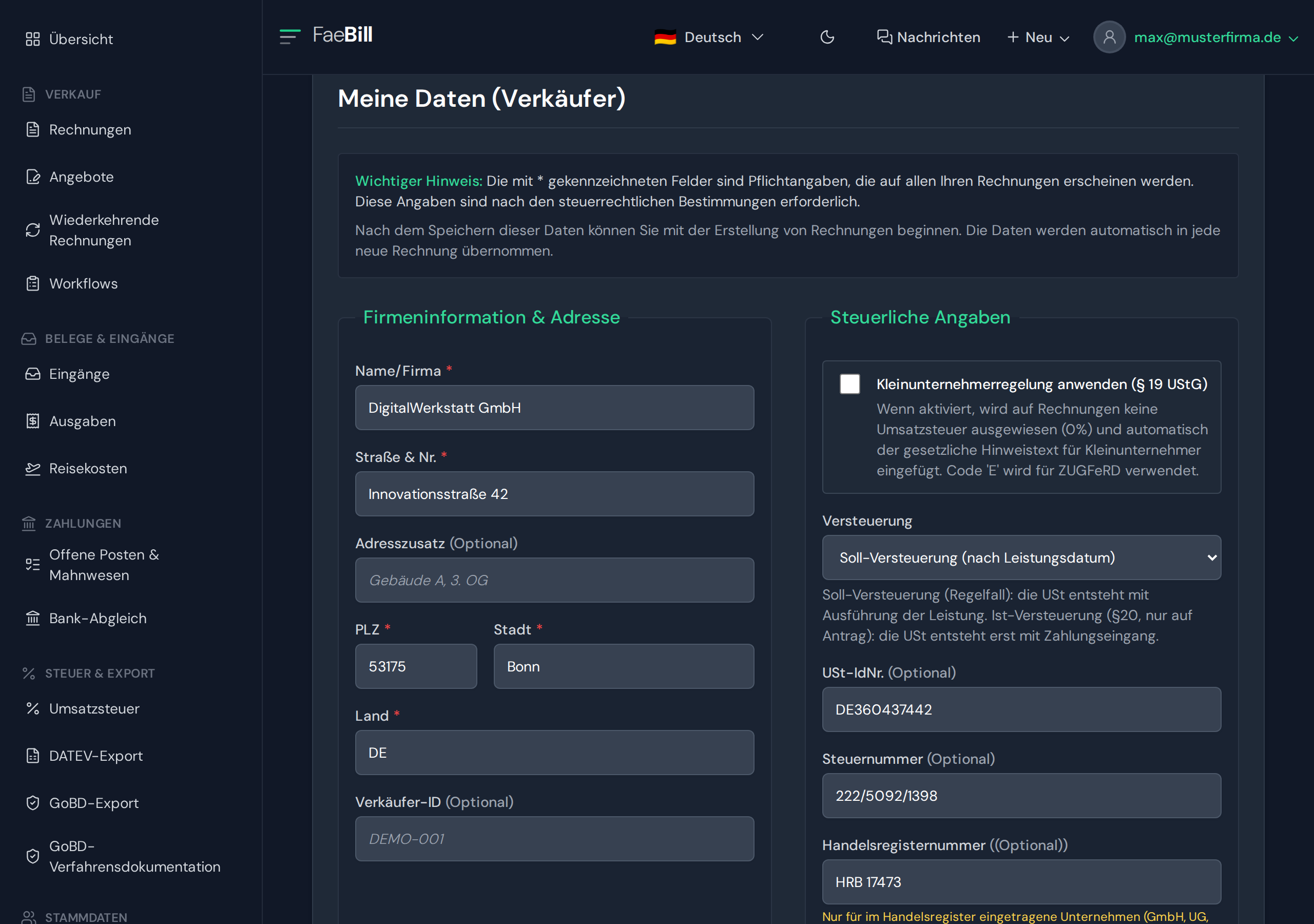
To ensure your invoices contain all legally required details, enter your company details once:
- Navigate to your e-mail address → "Profile"
- Fill in the fields:
- Company name
- Address
- Tax number (Steuernummer) / VAT identification number (USt-IdNr.)
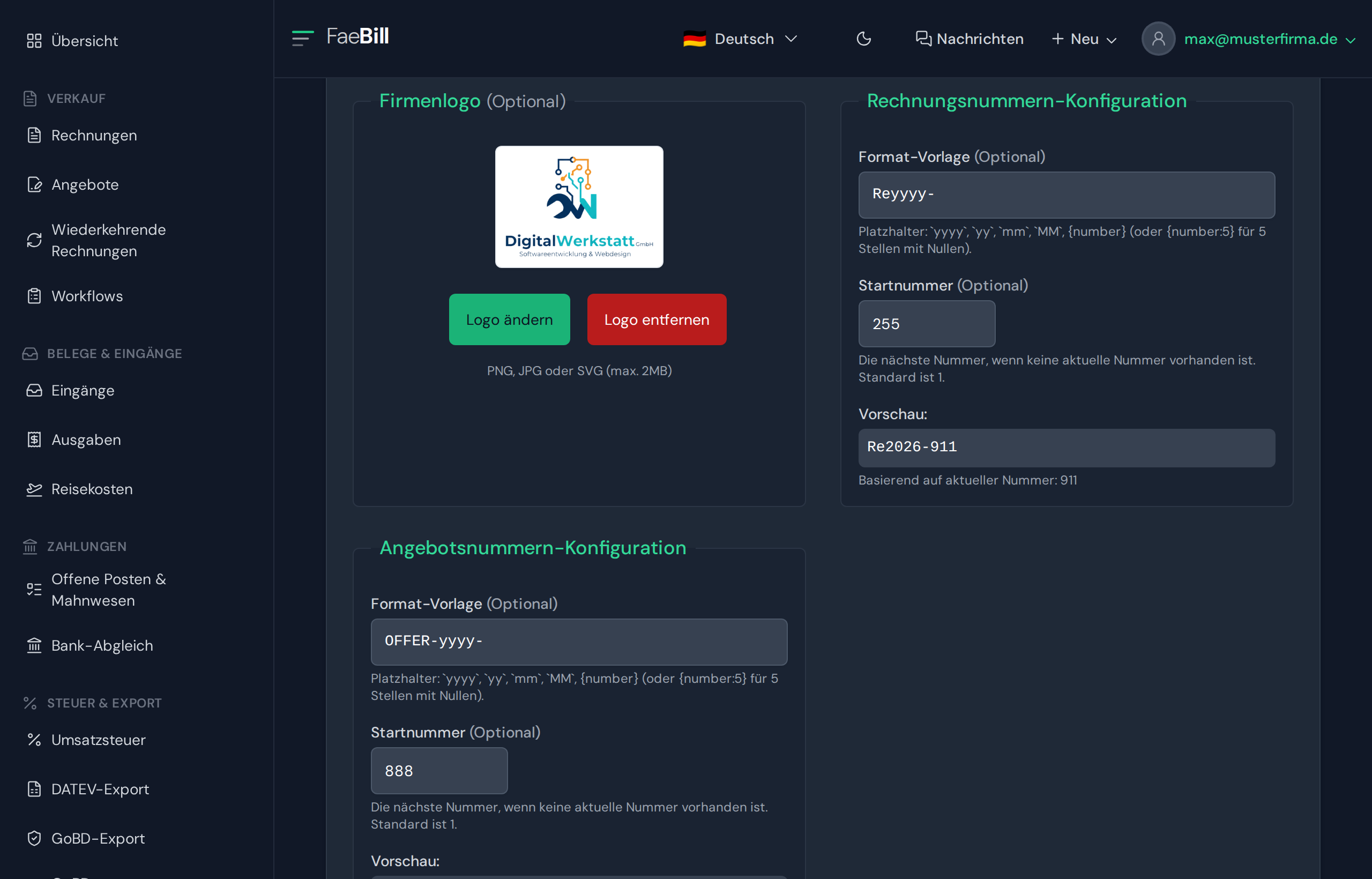
- Bank details (optional, e.g. for the SEPA QR code (GiroCode) on the invoice)
- Invoice number format (e.g.
RE-{YYYY}-{NNNN})
- Click on "Save"
Tip: The invoice number format with placeholders ensures that your invoice numbers are generated sequentially and automatically (e.g. RE-2025-0001, RE-2025-0002, …).
⏱ Step 3: Create your first customer (60 seconds)
- In the main menu, click on "Master Data"
- Click on "+ New customer"
- Enter the customer details:
- Name / company name
- Address
- E-mail (for automatic invoice sending)
- VAT ID (mandatory for reverse charge and intra-Community supplies of goods, Section 14a UStG); optional: customer number, payment terms
- Click on "Save customer"
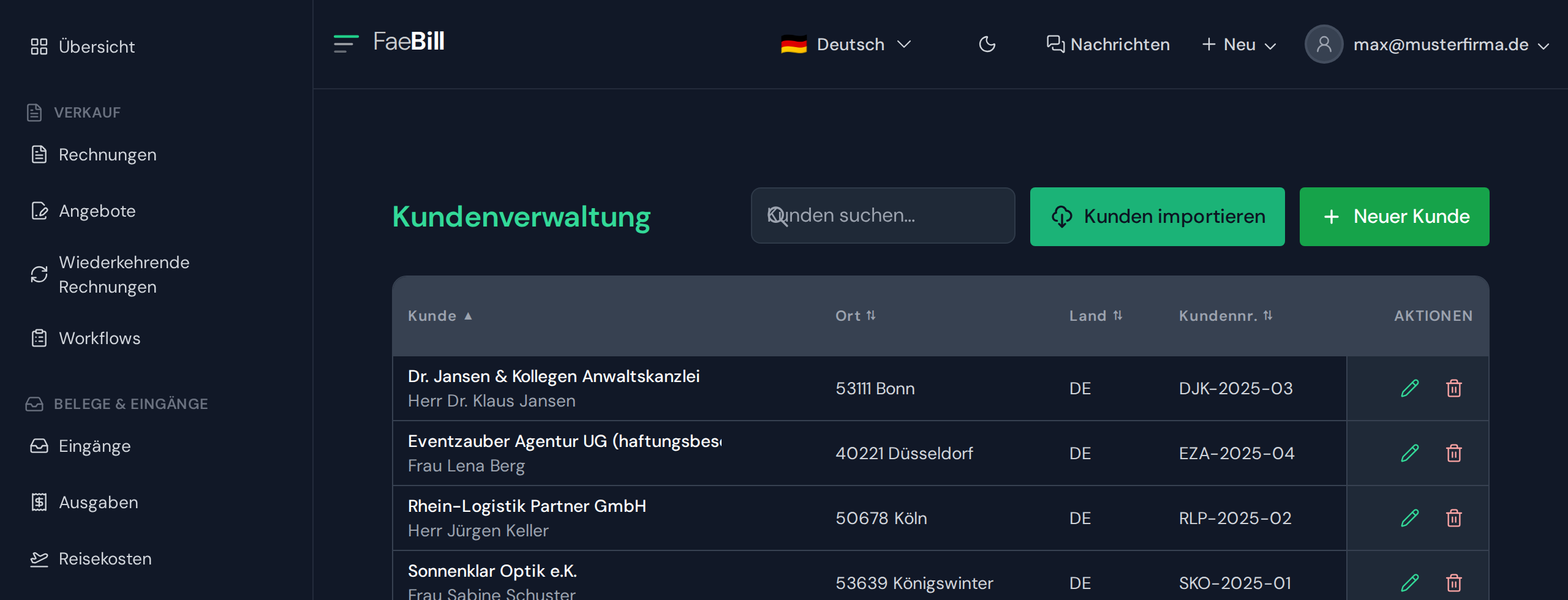
Time-saving tip: Next time, simply select the customer from the list – no need to enter the details again!
⏱ Step 4: Create the ZUGFeRD invoice (120 seconds)
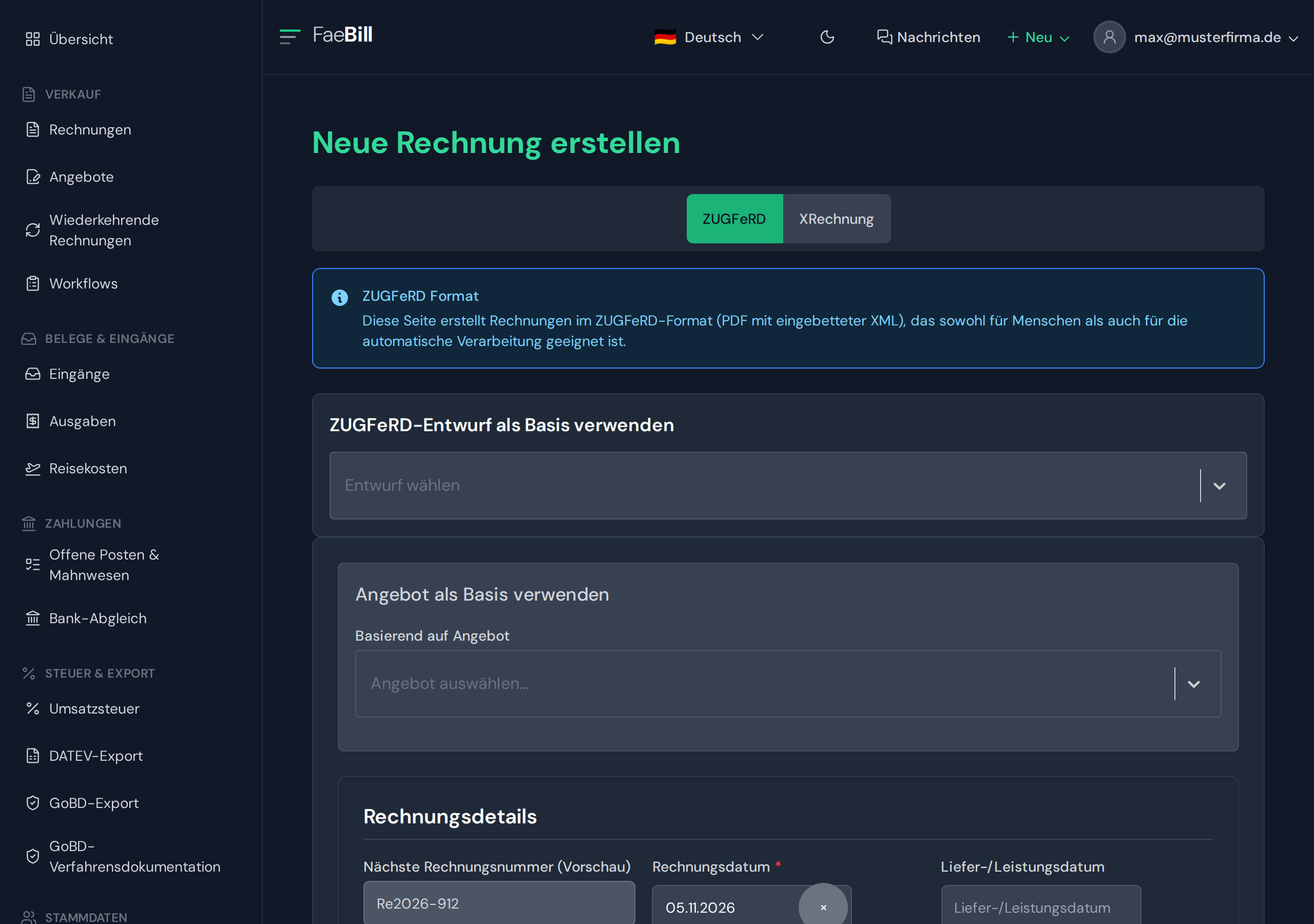
Now let's create the actual invoice:
- Click on "New invoice" in the dashboard
- Select the customer from the drop-down menu
- The invoice date is automatically set to today (adjustable)
- Enter the date of supply or supply period
- The invoice number is generated automatically
- Add invoice line items:
- Click on "+ Add line item"
- Product name: e.g. "Web design service"
- Quantity: 1
- Unit: hour
- Unit price: €80.00
- VAT rate: 19%
- Optional: add further line items
- Optional: add a note (appears on the invoice)
- Under "Document language", select your preferred language (German is preselected)
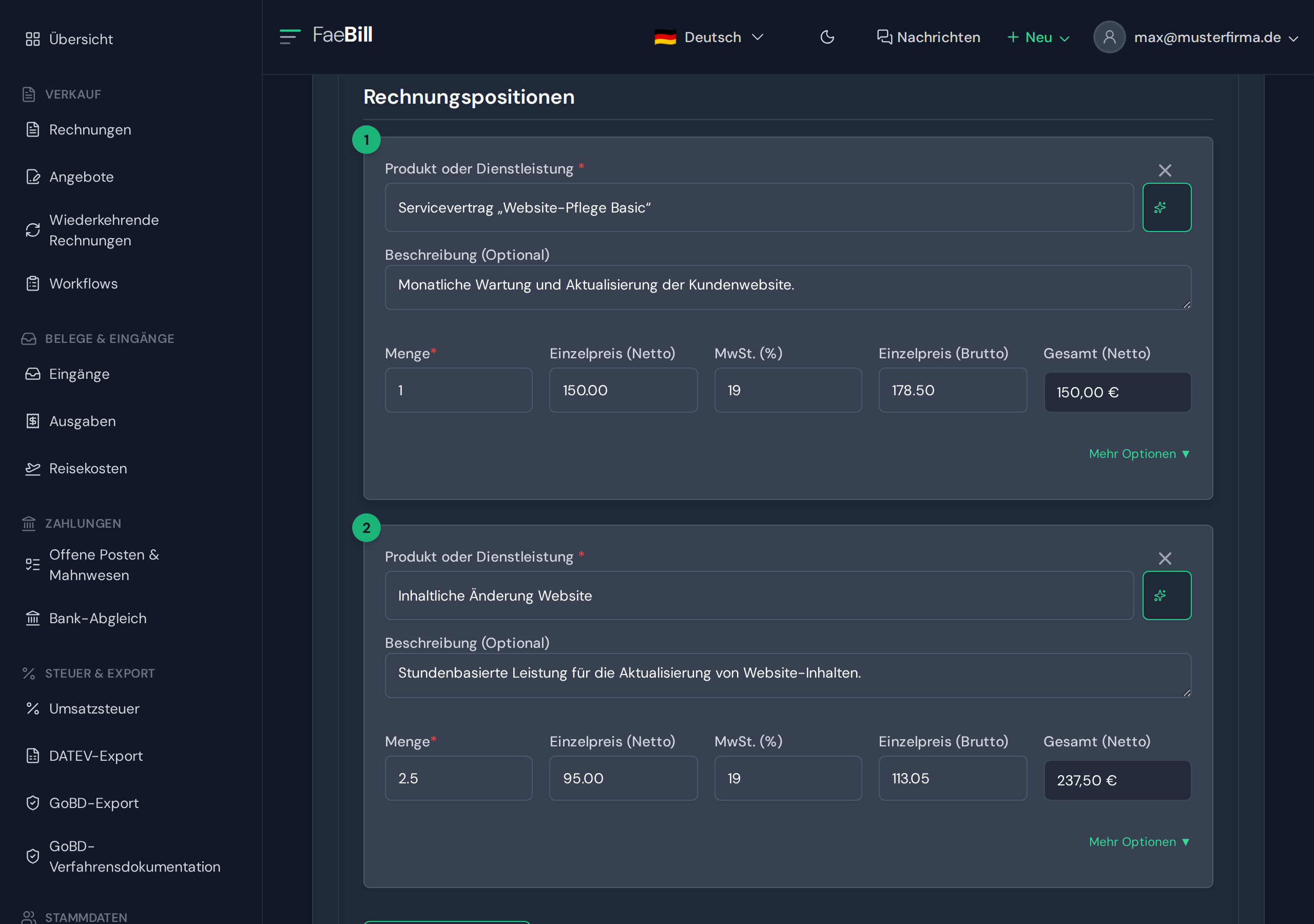
Pro feature: Click on the magic icon next to the product name to activate AI text enhancement. The AI phrases your description in a more professional and sales-oriented way!
⏱ Step 5: Check the preview & generate the invoice (30 seconds)
- Click on "Show preview"
- Check the invoice for accuracy:
- Are all details correct?
- Are the amounts right?
- Does the layout look professional?
- If everything is in order: click on "Create ZUGFeRD invoice"
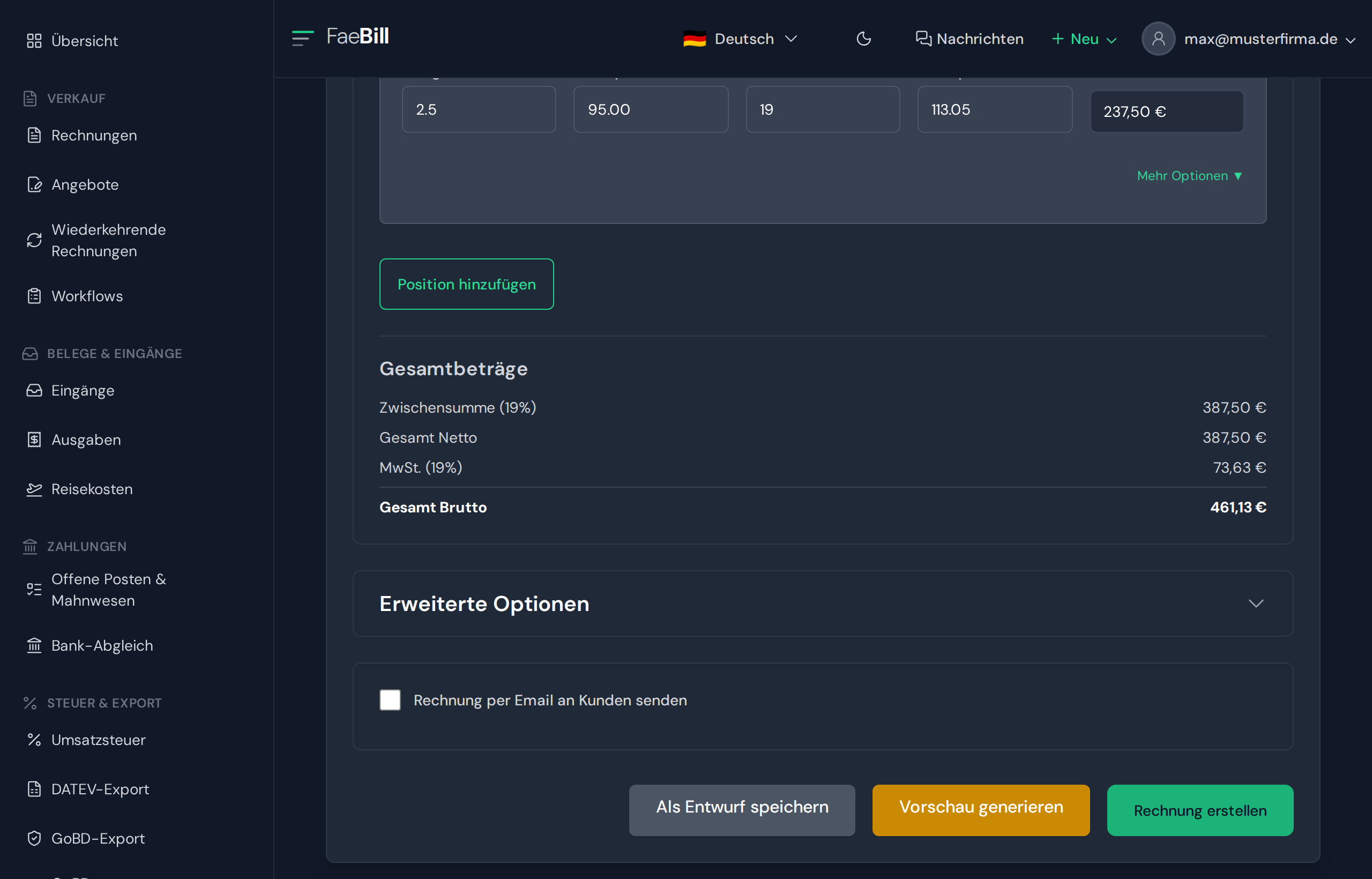
The following now happens in the background (automatically, without any action on your part):
- Generation of the structured XML data in accordance with the European standard EN 16931 on electronic invoicing
- Creation of the professional PDF layout
- Embedding of the XML data in the PDF/A-3B format
- Storage in your invoice history for later retrieval. You ensure retention in accordance with Section 14b UStG and the GoBD (German principles for the proper keeping and retention of books, records and documents in electronic form and for data access) using your archiving or DMS system.
Done! Your first ZUGFeRD invoice has been created.
⏱ Step 6: Send the invoice (30 seconds)
You have two options:
Option A: Automatic sending by email
- Click on "Send by email"
- FaeBill automatically sends the invoice to the customer email address on file
- You receive a copy as confirmation
- The dispatch is logged in the system
Option B: Manual download
- Click on "Download"
- Save the ZUGFeRD PDF file on your computer
- Send the file via your own email client
Email text tip: FaeBill automatically adds a professional cover text, which you can customise in the settings.
Congratulations!
You have just created and sent your first ZUGFeRD-compliant e-invoice in only 5 minutes.
Before sending, check the mandatory invoice details (see the section "Mandatory invoice details on the ZUGFeRD invoice").
And the best part: You will now create every further invoice even faster – after all, the basic data is already stored!
What is ZUGFeRD? The basics explained simply
ZUGFeRD stands for "Zentraler User Guide des Forums elektronische Rechnung Deutschland" and is a hybrid invoice standard that combines the best of two worlds:
- PDF file (for humans): A visually appealing, readable invoice, just as you know it
- XML file (for machines): Structured invoice data that can be read in automatically by accounting software
The metaphor: the hybrid car of the invoicing world
Think of ZUGFeRD as a hybrid car: it combines a conventional engine (the PDF that people read) with an electric motor (the XML data that computers process). The result? Maximum efficiency and compatibility.

The technical details (in brief)
- Format: PDF/A-3 with embedded XML file
- Standard: EN 16931 (European standard)
- Current version: ZUGFeRD 2.x (currently 2.5, as at November 2026), technically identical to Factur-X
- Profiles: MINIMUM, BASIC WL, BASIC, EN 16931, EXTENDED, XRECHNUNG (only the profiles from BASIC upwards count as e-invoices under Section 14 UStG)
Important for you to know: With FaeBill, you do not need to worry about these technical details – the software generates ZUGFeRD invoices in the EN 16931 profile. You remain responsible for the accuracy of the content of your details.
From ZUGFeRD 1.0 to 2.x: the evolution of the e-invoice
The development of ZUGFeRD shows how the standard has evolved into a European solution:
| Version | Year | Special feature |
|---|---|---|
| ZUGFeRD 1.0 | 2014 | First version - German standard |
| ZUGFeRD 2.0 | 2019 | Harmonisation with French Factur-X |
| ZUGFeRD 2.1 | 2020 | Adjustments to EN 16931 |
| ZUGFeRD 2.2 | 2022 | Full compatibility with Factur-X 1.0.6 |
| ZUGFeRD 2.3 | 2024 | Further development of the standard |
| ZUGFeRD 2.4 | December 2025 | Further development of the standard |
| ZUGFeRD 2.5 | June 2026 (to be applied from 1 July 2026) | Current version |
Why ZUGFeRD 2.x matters:
- Aligned at European level – technically identical to the French Factur-X; some other EU Member States have their own mandatory formats and platforms.
- Recognised – in Germany, ZUGFeRD from the BASIC profile upwards is an e-invoice within the meaning of Section 14 UStG; the standard is continuously updated (currently version 2.5).
- Wide acceptance – supported by most accounting programs
ZUGFeRD vs. XRechnung: what is the difference?
Both formats are structured e-invoices, but they differ in how they are presented:
| Feature | ZUGFeRD 2.x | XRechnung |
|---|---|---|
| Format | Hybrid (PDF + XML) | Pure XML |
| Readability | PDF readable by humans | Machine-readable only |
| Scope of application | B2B, B2C, B2G | Mainly B2G (public authorities) |
| E-invoice under Section 14 UStG | yes (from the BASIC profile upwards) | yes |
| User-friendliness | Very high | Low (without a viewer) |
| Archiving | complete file (PDF with embedded XML) | XML file – ensure readability throughout the retention period |
Our tip for SMEs:
Go for ZUGFeRD! The hybrid approach gives you maximum flexibility:
- Your customers see a normal, attractively designed PDF invoice
- Customers with modern accounting software benefit from automatic data import
- You are ideally prepared for mandatory e-invoicing (obligation to be able to receive since 2025; obligation to issue from 2027 for businesses with a previous-year total turnover above €800,000, from 2028 as a rule for all)
How does ZUGFeRD work in practice?
The life cycle of a ZUGFeRD invoice in 4 steps:
1⃣ Creation
You create an invoice in your software (e.g. FaeBill). The software automatically generates:
- A professional PDF layout
- The structured XML data in accordance with EN 16931
- The link between the two components
2⃣ Sending
The ZUGFeRD invoice is sent to the customer by email as a single PDF file – just as easily as a normal PDF invoice.
3⃣ Receipt
Your customer receives the invoice and can:
- Option A: Open the PDF and read it as usual
- Option B: Import the invoice into their accounting software with one click
4⃣ Automated processing
The recipient's accounting software:
- Reads out the XML data
- Automatically imports all invoice information
- Creates posting suggestions
- Saves time when processing invoices

The 7 compelling benefits of ZUGFeRD for your business
1. Increased efficiency & massive time savings
Before: 5-10 minutes of manual data entry per invoice
After: Automatic import in 5 seconds
Worked example: with 100 incoming invoices per month and around 10 minutes saved per invoice, you save around 16 hours of working time – equivalent to two working days.
2. Drastic reduction in errors
Even with an assumed error rate of 1–3% for manual data entry, 1,000 invoices a year mean up to 30 incorrect postings – with all the consequences for your financial reporting.
ZUGFeRD avoids typing errors, because the data is taken directly from the file.
3. Faster payment processes = better liquidity
Worked example:
- Previous payment terms: 30 days
- Assumed payment with paper invoice: average 42 days
- Assumed payment with ZUGFeRD: average 35 days
- Liquidity gain: 7 days per invoice
With a monthly invoice volume of €50,000, this means an additional €11,667 in liquid funds in your business.
4. Retention under GoBD: what your business must ensure itself
FaeBill generates your invoice as a ZUGFeRD file. Whether your retention complies with the GoBD (German principles for the proper keeping and retention of books, records and documents in electronic form and for data access) depends on your entire process: unalterable storage, a retention period of 8 years, procedural documentation (Verfahrensdokumentation). There is no such thing as GoBD certification.
5. Sustainability & environmental protection
Concrete figures:
- 1 paper invoice = approx. 20 g CO₂ (estimate)
- 1,000 digital invoices/year = saving of 20 kg CO₂
- In addition: no paper, no printing costs, no postage
Your corporate social responsibility starts with your own processes.
6. Scalability without extra effort
Whether you create 10 or 10,000 invoices per month, the process remains just as simple. Grow without your administration having to grow with you.
7. What the law has required since 2025 – and what is coming in 2027 and 2028
Since 2025, the e-invoice in accordance with the EN 16931 standard has been the standard for domestic transactions (i.e. both parties established in Germany) between businesses. For supplies from 2027 onwards, it is mandatory for businesses with a total turnover of more than €800,000 in the previous calendar year; from 2028 onwards, for almost all businesses.
Legal framework: what has applied since 2025 and what is coming in 2027 and 2028
Mandatory e-invoicing is coming – are you prepared?
Mandatory e-invoicing is being introduced in stages:
- Since 1 January 2025: all businesses in Germany must be able to receive e-invoices.
- Until 31 December 2026 (inclusive): invoices may still be issued on paper or as a PDF (PDF with the consent of the recipient).
- For supplies from 1 January 2027: obligation to issue e-invoices for businesses with a total turnover of more than €800,000 in the previous calendar year. All others may still use paper or – with the recipient's consent – PDF in 2027. In addition, transmission via EDI with the consent of the recipient remains permitted for everyone until the end of 2027.
- From 1 January 2028: obligation to issue e-invoices for almost all businesses in B2B transactions (exceptions include small business owners under Section 19 UStG (German VAT Act), small-amount invoices with a total amount (gross) not exceeding €250 (Section 33 UStDV) and travel tickets).
You can find all the details in our guide to mandatory e-invoicing 2027.
What counts as an “e-invoice” within the meaning of the law?
An e-invoice must contain structured data in accordance with EN 16931. The following are accepted:
- ZUGFeRD (from profile BASIC upwards)
- XRechnung
- Other EN 16931-compliant formats
Important: Simple PDF invoices (without XML data) do not count as e-invoices!
Only the ZUGFeRD profiles from BASIC upwards (BASIC, EN 16931, EXTENDED, XRECHNUNG) are e-invoices, not MINIMUM or BASIC WL.

Mandatory invoice details on the ZUGFeRD invoice
Under Section 14(4) UStG, every invoice must contain the following details:
- full name and full address of the supplying business and of the recipient of the supply
- tax number (Steuernummer) or VAT identification number (USt-IdNr.) of the supplying business
- date of issue
- sequential, unique invoice number
- quantity and customary trade description of the supply
- time of the supply of goods or services (for advance payments, the time the payment is received)
- consideration broken down by tax rates and VAT exemptions, as well as any reduction of the consideration agreed in advance, for example an early payment discount (Skonto)
- tax rate and tax amount, or a reference to the VAT exemption
- special notes where applicable, such as „Steuerschuldnerschaft des Leistungsempfängers“ (reverse charge) or „Gutschrift“ (self-billing)
For small-amount invoices with a total amount (gross) not exceeding €250 (Section 33 UStDV), reduced details are sufficient. Small business owners under Section 19 UStG do not show VAT; their note to this effect is a separate detail outside this list, and you should clarify the exact wording with your tax advisor (Steuerberater). Source: Section 14 UStG.
Implementation in your business: your 8-step checklist
How to make the switch to ZUGFeRD – structured and without pitfalls:
Step 1: Take stock
- How many invoices do you create each month?
- Which accounting software do you use?
- Which formats do your main customers accept?
Step 2: Choose software
- Check whether your current software supports ZUGFeRD
- If not: evaluate modern solutions such as FaeBill
Step 3: Document processes
- Record your current invoicing processes
- Identify potential for optimisation
Step 4: Train employees
- Inform your team about the changeover
- Explain the benefits (less manual work!)
Step 5: Inform customers
- Communicate the changeover proactively
- Emphasise the benefits for your customers (faster processing)
Step 6: Start a test phase
- Create your first test invoices
- Initially send ZUGFeRD invoices to selected customers
Step 7: Gather feedback
- Ask customers about their experiences
- Optimise the invoice layout if necessary
Step 8: Rollout & monitoring
- Switch completely to ZUGFeRD
- Monitor key figures (payment terms, error rate)
Time required with FaeBill: Setting up FaeBill with the wizard takes about 2 minutes; how long the overall switch-over of your processes takes depends on your invoice volume.
Create ZUGFeRD invoices easily and automatically with FaeBill
Now it gets practical! FaeBill was developed to make getting started with digital invoicing as easy as possible for SMEs.
Why FaeBill is the ideal ZUGFeRD solution for SMEs:
1. No prior technical knowledge required
You do not need to understand what XML is or how PDF/A-3 works. FaeBill takes care of all the technical details – you focus on your business.
2. Get started in 5 minutes
No weeks-long implementation, no IT department needed:
- Register free of charge
- Enter your company details once
- Create your first ZUGFeRD invoice – done!
3. Automatic ZUGFeRD generation
For every invoice, FaeBill automatically generates:
- EN 16931-compliant XML data
- PDF/A-3B-compliant presentation
- Correct embedding of the data structures
4. Multilingual invoices for international business
Send professional ZUGFeRD invoices in 5 languages:
- German
- English
- French
- Italian
- Spanish
Before the invoice is created, FaeBill shows you the translation for review.
5. More than just ZUGFeRD creation
FaeBill brings together invoicing and receivables management in one application:
Invoicing & formats:
- ZUGFeRD invoices (EN 16931)
- XRechnung for public authorities
- Quotes & interim invoices (Abschlagsrechnungen)
- Cancellation invoices (Stornorechnungen), issued as a credit note with type code 381
Automation:
- SEPA QR code (GiroCode) on the invoice for quick bank transfers
- Intelligent dunning (3 levels)
- Subscription management with recurring invoices
- Email delivery with delivery and open status
Administration:
- Customer & product database
- Cockpit with a liquidity forecast based on due dates
- Workflow management
6. Security
- Firebase cloud infrastructure (Google)
7. Transparent pricing
- Free basic plan: permanently free of charge with 4 invoices per month – ideal for testing and for founders
- Premium from €9.99/month: Unlimited invoices, all features
- No set-up fees, no hidden costs
Further reading
- Guide to mandatory e-invoicing 2027
- Receiving and processing incoming ZUGFeRD invoices
- Printing an e-invoice: what is permitted?
- ZUGFeRD 2.5: what is changing
- Creating multilingual invoices
Conclusion: your invoicing deserves an upgrade
The digital transformation of finance is no longer a vision of the future – it is reality. With mandatory e-invoicing (obligation to be able to receive since 2025, obligation to issue from 2027 or 2028 depending on previous-year turnover), switching to structured invoice formats such as ZUGFeRD is not just advisable but required by law.
The key takeaways at a glance:
ZUGFeRD 2.x is the established standard for hybrid e-invoices in Germany and – as Factur-X – in France
Clarity: a ZUGFeRD file using the BASIC profile or higher is an e-invoice within the meaning of the German VAT Act (Umsatzsteuergesetz, UStG); retention in line with the GoBD (German principles for the proper keeping and retention of books, records and documents in electronic form and for data access) remains your responsibility
Easy start: With the right software, you are ready to go in just 5 minutes
Why act now?
The sooner you switch to digital invoicing processes, the longer you benefit from the advantages. Businesses that already work with ZUGFeRD today:
- Save dozens of working hours every month
- Improve their liquidity through faster incoming payments
- Are prepared, stress-free, for the legal changes in 2027 and 2028
- Position themselves as modern, digital business partners
FaeBill makes getting started easier than ever. No complex IT implementation, no weeks of training, no hidden costs – just an intuitive solution that works.
Are you ready for the future of invoicing?
Try FaeBill for free now and create your first ZUGFeRD-compliant e-invoice in just 5 minutes.
Get started with FaeBill today
No credit card required • Instant access • 5-minute set-up
Legal position as at: November 2026
Note: Not tax or legal advice
This article is for general information only. It is not tax or legal advice for your individual situation and cannot replace such advice. It describes German and, where stated, EU law. Other jurisdictions are not covered. Although we research carefully, we cannot guarantee that the content is current, complete or correct. Legislation, case law and administrative guidance (for example, German Federal Ministry of Finance (BMF) circulars or EU initiatives such as ViDA) may change after publication. Please consult a German tax advisor (Steuerberater), a lawyer or another qualified professional for your specific situation. Our statutory liability remains unaffected.
Status: November 2026